Your team already logs every repair in Property Meld: when the request came in, and when the work was marked complete. Connect Property Meld to your PropertyManagement.com profile, and we calculate your Speedy Repair time to fix from that history after every sync, with no exports to pull. Our team verifies the result before the certification goes live. Setup takes 15 to 30 minutes, and most of that is a quick chat with Property Meld support.
What you'll need
- An admin user on a Property Meld plan that includes API access (the Ops plan on current pricing; details below). Support turns API access on for a specific admin, and that admin creates the keys.
- Your PropertyManagement.com Client Dashboard login. If you're not verified yet, get verified first; it's free.
Before you start: API access is an Ops plan feature
Property Meld's pricing page lists API access only on its Ops plan: $2.00 per unit per month, versus $1.60 for Core, with a $200 monthly minimum (as of September 2026). If you're on Core, the upgrade runs $0.40 more per door, or about $120 a month for a 300-unit portfolio at list price. If you're not sure which plan you're on, ask in Step 1: support confirms your account qualifies before they turn anything on.
Step 1: Ask Property Meld support to turn on API access
You won't find a setting for this inside Property Meld. Support switches on API access (Property Meld calls it API v2) for your admin user, and in our case it happened during the same chat. Open Property Meld's support chat and choose Talk to Support, or email support@propertymeld.com, and send something like this:
Hi, I'm an admin on [your company]'s Property Meld account. Please enable API v2 access on my user so I can create API keys for our PropertyManagement.com integration.
Step 2: Switch to your Nexus Partner account
Once support confirms, refresh Property Meld or log out and back in. Use the switch account option in the top-right corner, and you'll see a new Nexus Partner account next to your usual one. Select Nexus Partner.
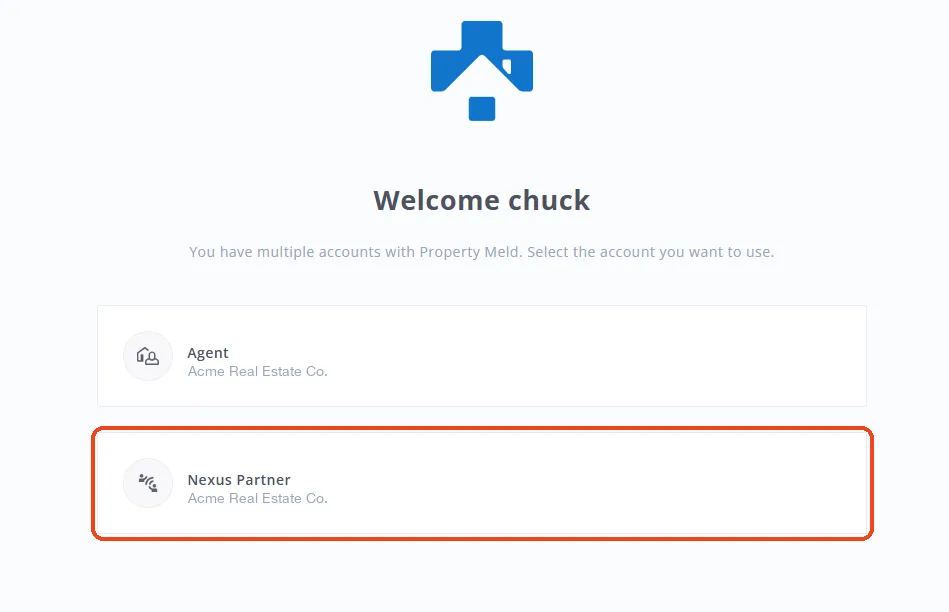
Don't let the name throw you. Nexus Partner is where Property Meld keeps API keys, even for property management companies.
Step 3: Open API Keys and click Create API Key
In your Nexus Partner account, click API Keys in the left menu, then click Create API Key in the top-right corner.
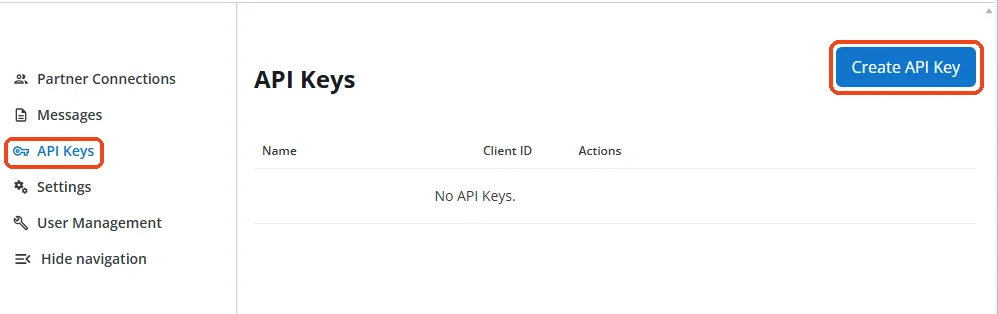
Property Meld lets you keep more than one key, so create one just for PropertyManagement.com. If you ever want to cut off our access, you can revoke that key without touching your other integrations.
Step 4: Copy your Client ID and Client Secret
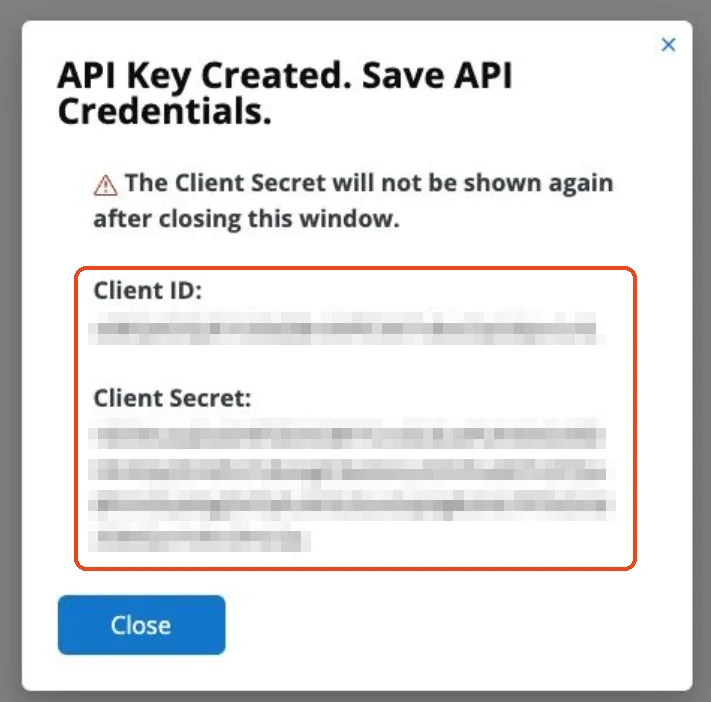
A window opens with your new Client ID and Client Secret. Copy both somewhere safe before you close it.
Step 5: Connect it in your Client Dashboard
In your PropertyManagement.com Client Dashboard, open Connect Tools, select Property Meld, and fill in two fields:
- Client ID. Paste it from Property Meld.
- Client secret. Paste it from Property Meld.
Click Save connection, and we verify the credentials with Property Meld on the spot. Your credentials are encrypted per organization and never shown again after you save.
Property Meld connects alongside your property management software, so keep your PMS connected too. If you run AppFolio or Rentvine, the AppFolio guide or the Rentvine guide covers that connection.
What we sync, and why
The connection only reads. We pull your melds (each work order, including when it was created and when it was marked complete) plus the properties and units they belong to. We never create, edit, close, or comment on a meld.
That data powers the verified side of your profile:
- Certifications. Your Property Meld connection powers Speedy Repair, computed from your real time-to-fix: how long each meld takes from creation to completion. If your PMS is connected too, Property Meld becomes the source for Speedy Repair, because it's where your maintenance actually lives. See how we calculate Speedy Repair.
- Verified performance history. The proof surface owners actually read on your public profile, with a "data last updated" stamp that shows the numbers are fresh.
Your synced data is handled under our data collection and usage policy for integration data: it powers your own profile and certifications, anything beyond your profile is aggregate and de-identified, and nobody gets your identifiable data without your explicit opt-in.
Replacing or revoking a key
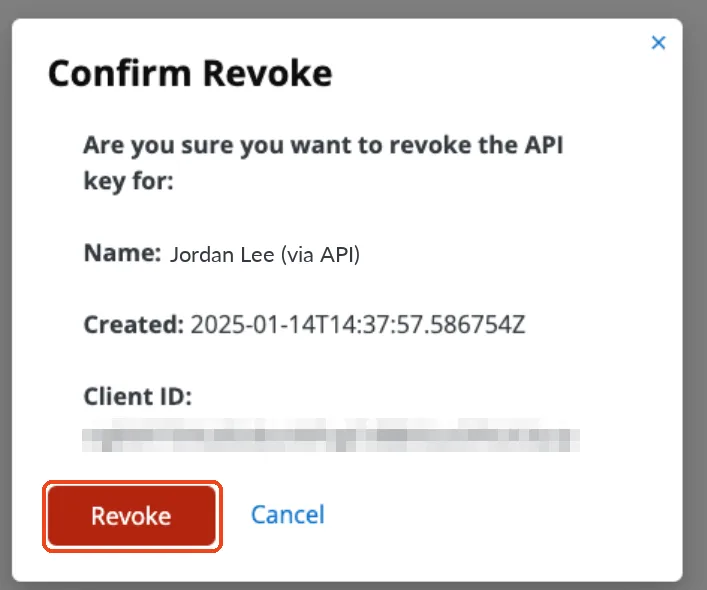
To rotate a key or cut off access, go back to Nexus Partner, open API Keys, click Revoke next to the key, and confirm. Revoking a key cuts off the PropertyManagement.com sync, so when you're replacing a key, create the new one first, update the connection in Connect Tools, then revoke the old one.
Troubleshooting
- You don't see a Nexus Partner account. API access isn't on for your user yet, or your session hasn't refreshed. Log out and back in. If it's still missing, ask support to confirm API v2 was enabled on your user, since access is tied to a specific admin.
- You can't find API Keys or Create API Key. You're probably still in your regular account. Use the switch account option in the top-right corner and pick Nexus Partner.
- Credentials rejected. Check that you copied the full Client Secret with no extra spaces. If you closed the window before copying it, revoke that key, create a new one, and paste the fresh pair.
- The sync stopped after it was working. Someone may have revoked the key. Create a new one, open Connect Tools, click into Property Meld, paste the new values, and hit Update connection.
Frequently asked questions
Which Property Meld plan do I need?
One that includes API access, which on Property Meld's current pricing means Ops. Support confirms your account qualifies when you ask.
Can PropertyManagement.com change anything in my Property Meld account?
We don't. Property Meld doesn't offer read-only API keys, so every key technically carries read and write permission, but our integration only reads data and never creates or edits anything in your account. And because the key is dedicated to us, you can revoke it anytime without touching anything else.
What does the connection cost on the PropertyManagement.com side?
Nothing. Claiming your profile, connecting your software, running property owner surveys, and earning certifications are free for property managers, permanently. Money never touches the math.