Connect AppFolio to your PropertyManagement.com profile and your verified performance updates itself. We read your reports, compute your numbers, and keep your certifications current without you exporting a thing. Setup takes about five minutes.
Quick answer: In AppFolio, open your account menu, then General Settings, then Manage API Settings, and copy your Reports API Client ID and Client Secret (click Generate New Credentials if none are listed). In your PropertyManagement.com Client Dashboard, open Connect Tools, choose AppFolio, and enter your database subdomain plus both credentials. We verify the connection on the spot.
What you'll need
- An AppFolio Property Manager account on the Plus plan or higher (the Reports API is not included on Core; details below)
- The System Administrator role in your AppFolio account (that's who can open General Settings and API settings)
- Your PropertyManagement.com Client Dashboard login. Not verified yet? Get verified first; it's free.
Before you start: the Reports API requires AppFolio Plus
The connection runs on AppFolio's Reports API, which AppFolio includes with its Plus and Max plans. You can see the line item on AppFolio's pricing page: "AppFolio API (read only)" sits under Plus. If you're on Core, Manage API Settings won't offer Reports API credentials, and you'll need to talk to your AppFolio account manager about upgrading.
What the upgrade costs. AppFolio moved to quote-only pricing, so the exact number depends on your portfolio and your rep. Directionally: the last rates AppFolio published (mid-2024) were $1.49 per unit per month for Core and $3.20 for Plus, and 2026 third-party estimates put Plus between $3.00 and $3.50 per unit with monthly minimums reported from $900 to $1,500. Figure roughly double per door: at the last published rates, a 300-unit portfolio would pay about $500 more per month on Plus. Get the real quote from your account manager before you commit.
One consolation if you upgrade: the Reports API is the same access used by accounting, analytics, and BI tools across the industry, so it unlocks more than just your PropertyManagement.com sync.
Step 1: Open General Settings in AppFolio
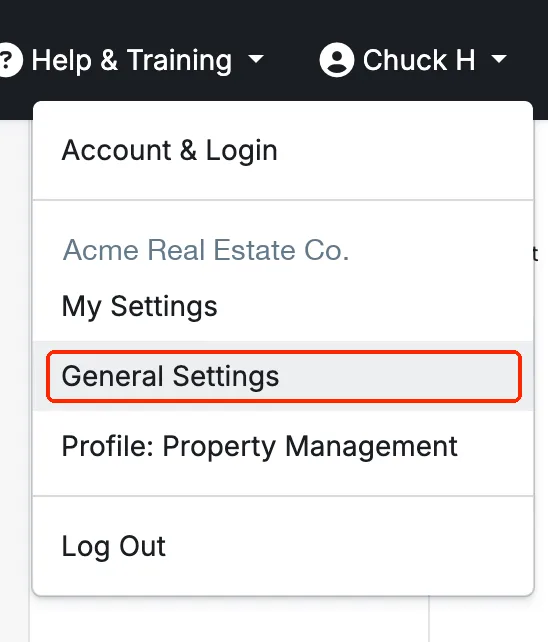
In AppFolio Property Manager, click your account name in the top-right corner, then click General Settings.
Step 2: Open Manage API Settings
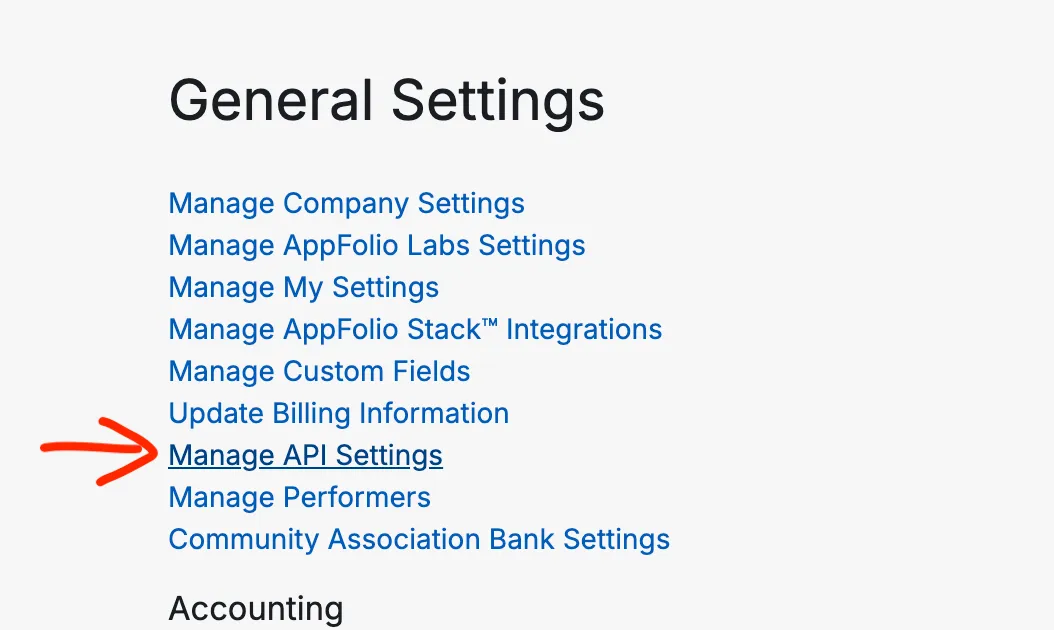
On the General Settings page, click Manage API Settings.
Step 3: Get your Reports API credentials
On the API Settings page, look under Reports API for My Reports API Credentials. If a Client ID and Client Secret are listed, copy both. If the section only shows a Generate New Credentials button, click it once, then copy the Client ID and Client Secret it creates.
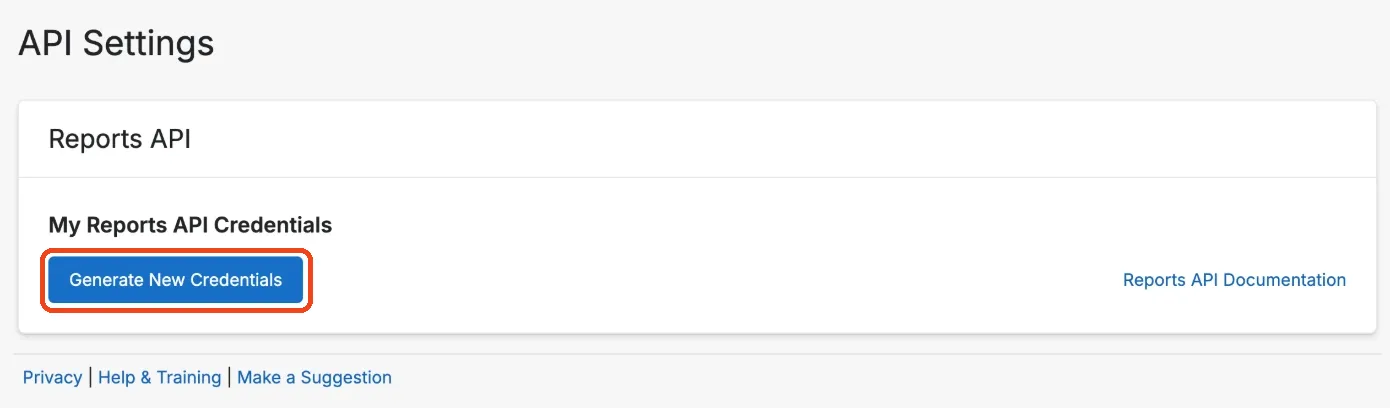
⚠️ AppFolio allows one active set of credentials. Clicking Generate New Credentials immediately invalidates the previous pair and breaks anything connected with it, including an existing PropertyManagement.com sync. Only regenerate when you have to, and if you do, come straight back to your Client Dashboard and update the connection with the new values.
Step 4: Connect it in your Client Dashboard
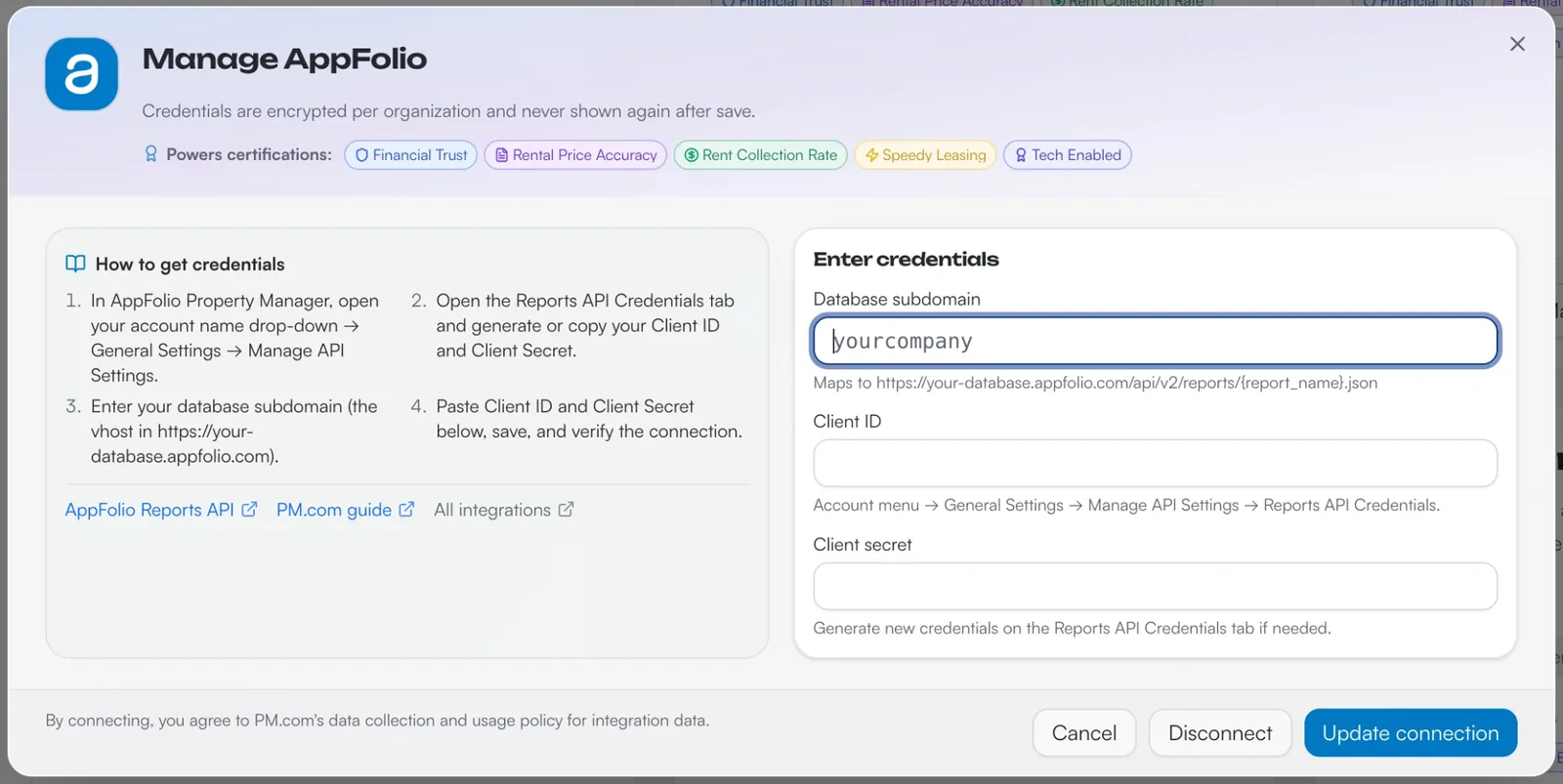
In your PropertyManagement.com Client Dashboard, open Connect Tools, select AppFolio, and fill in three fields:
- Database subdomain. The first piece of your AppFolio web address. If your team logs in at
https://sunnyvalepm.appfolio.com, the subdomain issunnyvalepm. Leave off thehttps://and the.appfolio.com. - Client ID. Paste it from AppFolio.
- Client secret. Paste it from AppFolio.
Click Save connection, and we verify the connection immediately. Your credentials are encrypted per organization and never shown again after you save.
From here we recalculate your metrics after every sync, with no exports to pull. Our team verifies each certification before it goes live.
What we sync, and why
The connection is read-only. Through the Reports API we pull the report data behind your operations: properties, units, leases, tenants and owners, work orders, and rent charge and payment activity. We never write to your AppFolio database, and we never see your bank or payment credentials.
That data powers the verified side of your profile:
- Certifications. Your AppFolio connection calculates Occupancy Rate and Speedy Leasing from your real numbers, plus Speedy Repair, Rent Collection Rate and Lease Renewal Expert in beta. Rental Price Accuracy and Financial Trust still need an upload; how to get certified lists the reports.
- Verified performance history. The proof surface owners actually read on your public profile, with a "data last updated" stamp that shows the numbers are fresh.
- Ranking in property owner searches. Your verified certifications count toward how you rank when property owners search PropertyManagement.com with their rental address.
Your synced data is handled under our data collection and usage policy for integration data: it powers your own profile and certifications, anything beyond your profile is aggregate and de-identified, and nobody gets your identifiable data without your explicit opt-in.
Troubleshooting
- Connection fails on save. Check the subdomain field. It should be just the first piece of your login URL, exactly as it appears in your address bar, with no
https://and no.appfolio.com. - Credentials rejected. Someone may have regenerated the pair since you copied it (check the Created date on AppFolio's API Settings page). Regenerate once, paste the fresh values, and save.
- You can't find Manage API Settings. Your AppFolio user may not have the System Administrator role, or your plan doesn't include the Reports API. Check with whoever administers your AppFolio account, or ask your AppFolio account manager about Plus.
- You regenerated credentials after connecting. The sync stopped the moment the old pair died. Open Connect Tools, click into AppFolio, paste the new credentials, and hit Update connection.
Frequently asked questions
Which AppFolio plan do I need to connect?
AppFolio Plus or above. The Reports API that powers the connection isn't part of AppFolio Core. If you're unsure which plan you're on, check whether Manage API Settings appears under General Settings, or ask your AppFolio account manager.
Can PropertyManagement.com change anything in my AppFolio account?
No. AppFolio's Reports API is read-only by design (write access lives in a separate AppFolio API we don't use). We can't edit properties, post charges, move money, or touch anything inside AppFolio.
What does the connection cost on the PropertyManagement.com side?
Nothing. Claiming your profile, connecting your software, running owner surveys, and earning certifications are free for property managers, permanently. Money never touches the math.